πIntro to Earning Gems
This page will go over the use of Gems as well as how to earn them on the server.
Contents
π What are Gems and how to use them? π
Gems are a premium currency similar to PokΓ©Coins, with the key difference being that they are used for a variety of specialised features on the server such as opening Crates, purchasing Ranks, and expanding your Realm size. While Gems can be bought directly from the official store, there are also several free-to-play methods available for earning them.
You can check your current Gem balance at any time by using the /bal command within the server.

Below is a complete list of all current Gem uses available on the server.
Crates
Crates can be accessed either at Spawn or by using the command /crates. They function as loot boxes that grant you the chance to receive a variety of random rewards, such as Legendary PokΓ©mon, Shiny PokΓ©mon, Gems, Keys, and more. Currently, there are three types of Crates available: Vote (Free), Basic (535 Gems), and Premium (2740 Gems), each offering its own unique reward pool. You may also purchase Crate Keys through the /store, which is currently the only method for gifting keys to other players.

/spawnTo purchase or open Crates directly, simply run /crates to bring up a GUI displaying the three Crate categories. If you do not own any keys, the GUI will show the Gem price for each Crate; if you do have keys, it will instead display the number of keys you currently possess.

/crates GUI for Vote, Basic and Premium CratesAfter using a key or purchasing a Crate with Gems by Right Clicking on the Crate selection, the Crate will begin to spin, and the item or PokΓ©mon it lands on will be awarded to you immediately. If you receive a PokΓ©mon and your party is full, it will be sent directly to your PC for later retrieval. Be sure to keep inventory space available for item rewards as if your inventory is full, you will not receive the items.
Ranks
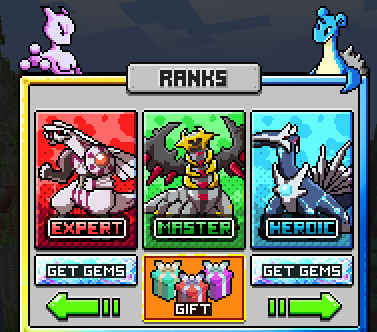
There are multiple ranks you are able to Purchase on the server which vary in price of Gems, each coming with more benefits than the last for the more expensive you go with the ranks. These benefits includes likes of Shiny Pokemon, Legendary Pokemon, Custom Nickname in-game, Access to exclusive kits, access to exclusive channels and giveaways in the Discord server, multiple command and features to benefit players and so on.

/storeTo begin purchasing ranks, simply run the /store command in-game, select the Ranks category, and choose the rank you wish to obtain provided you have the required amount of Gems.

/StoreUpon purchasing a rank, all associated perks will be granted to you immediately. Please note that if your Discord account is linked, the corresponding Discord role may take a few minutes to apply. Be sure to claim your one-time rewards by running /kit onetime and /kit RANKonetime (for example, /kit masteronetime) to receive all rank-exclusive bonuses.
RANK UPGRADES
If you already possess a lower rank and wish to upgrade to a higher one, you will receive a discount that is clearly displayed within the rankβs description. This ensures that all players ultimately pay the same total amount of Gems for a given rank regardless if they purchase it outright or upgrade gradually through the tiers.

GIFTING RANKS
You are able to purchase ranks for other players using /store by selecting the Gift button within the Ranks page in the store. You will be prompted to type in the name of the player you are purchasing the rank for in which it'll bring back up the GUI for you to continue with purchasing the rank for the player

/storeRealm Expansion
One of the main reasons why you may want to obtain gems is by increasing the size of your personal realm. As you go around the borders of your realm you'll see text stating about Unlocking this chunk for X amount of gems. You can see exactly what this looks like below:

As the text implies, in order to get access to this chunk you will need to pay X gems. If you have the gems amount stated and want to go ahead with purchasing it, all you need to do is Right Click which will bring up a confirmation. If you click on the green section which will confirm the purchase, the gems will be taken from you and the chunk will be accessible for you.

You are able to do this in any direction you want in whatever pattern you wish to have it. Your realm without any expansions is 10x10 Chunks in size so increasing the size of your realm is going to be incredibly handy for a lot of players especially if they love to build. There is a limit to how much you can expand your realm to, but there is certainly enough room for any player to have the space and freedom they need.
π How to use the Store π
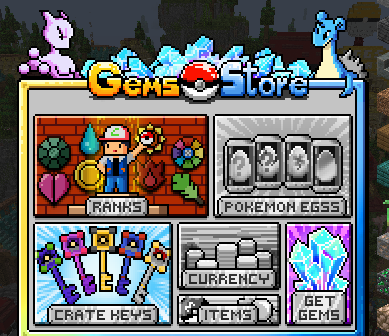
In order to access the store, all you need to do is run the command /store which will bring up the store GUI.

/storeFrom there, you can navigate through each category to select the items you wish to purchase. If you are buying a key, simply click on the desired key and select the Buy option. The key will then be delivered directly to your /crates menu in exchange for the required Gems. This GUI also provides a convenient link to the store should you wish to purchase additional Gems for the server.
π How can I purchase Gems? π
One of the easiest way players can obtain Gems is via purchasing them from our Ofiicial Store. There are a range of amounts you can purchase on the store corresponding to different amounts of $.
You can access our store via this link:
π Is there any other ways to obtain Gems? π
While purchasing Gems from the store is the quickest and most reliable method, there are several additional ways to earn Gems through gameplay, with more methods planned for future updates. The current ways to obtain Gems include:
Discord Giveaways hosted in the #giveaways channel. (Players with donor ranks receive access to bonus giveaways.)
Free Daily Spin available through our Modrinth Pack. For installation instructions, please refer to our Modrinth Installation Guide.
PokΓ©dex Rewards, which begin awarding Gems as early as 20% completion.
Events and Contests hosted in the #events channel on our Discord Server.
Crates at Spawn, which have a chance to reward Gems. Vote Crates, in particular, offer a small chance to receive Gems, and you earn a Vote Key for every daily voting link you complete.
More methods coming soonβ¦
Be sure to check back on this guide regularly, as new Gem-earning opportunities will continue to be added to the server.
Last updated