> For the complete documentation index, see [llms.txt](https://wiki.mmorealms.gg/llms.txt). Markdown versions of documentation pages are available by appending `.md` to page URLs; this page is available as [Markdown](https://wiki.mmorealms.gg/cobblemon-wiki/general-guides/a-complete-guide-to-safetrade.md).
# A Complete Guide to Safetrade
Here you'll find everything you need to know about the Safetrade mechanic found on the server.
**Contents**
1. [What is Safetrade?](#what-is-safetrade)
2. [How do I perform a Safetrade](#how-do-i-perform-a-safetrade)?
3. [What are the benefits to Safetrade?](#what-are-the-benefits-to-safetrade)
4. [Frequently Asked Questions \[FAQ\]](#frequently-asked-questions-faq)
***
### What is Safetrade?
SafeTrade is a server feature designed to allow players to trade securely with one another. Through this system, players can exchange Pokemon, PokeCoins, Gems and items in a protected trading system.
/trade GUI
Both parties must confirm the trade before it is finalized, ensuring that neither side can modify the agreement without both parties agreeing on it. Additionally there is logs that are saved which are maintained behind the scenes allowing staff to review transactions and address any issues that may arise, including attempted scams or other disputes between players.
Accepting and Adding to /trade
### How do I perform a Safetrade?
Performing a Safetrade is a straightforward process. However, to proceed, another player must first accept your Safetrade request before you can begin using this feature. To initiate a trade, simply use the command `/trade `, which will send a trade request to the specified player.
Trade Request Sent
If a player sends you a trade request, you will receive a notification in the public chat. From there, you may click the accept option to initiate the trade.
Trade Request
Once in the Safetrade menu you can begin to add specific items, pokemon and currencies into the trade. If you wish to cancel the trade at anytime all you need to do is press **`ESC`** and trade will be cancelled for both sides.
Safetrade Menu GUI
From there, you will be able to add the items or Pokémon you wish to include in the trade. You are able to select how much of a particular item you want to add instead of needing to set specific amounts prior the trade.
Item Select Count
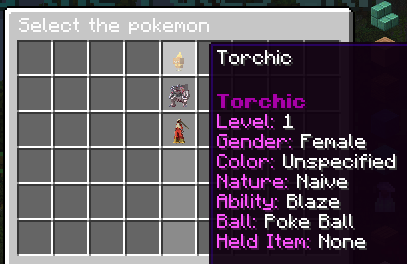
You may select Pokémon from your party to place into the trade, as illustrated in the images below:
You may also add **PokeCoins** and **Gems** to the trade by selecting the “Add Money” option and entering the exact amounts alongside which currency you are offering \[*i.e. 100 Gems, 5000 Pokecoins etc*] you wish to include, as shown in the images below:
Once you are satisfied with the trade, you will see several red glass panes displayed at the bottom of the trade interface.
Confirmation Button via /trade
Once you click to confirm the trade, you will be locked in. After the other player confirms as well, a timer will begin for the trade to be completed. If you decide to cancel the trade during this period, you may click the same buttons again to stop the timer.
Trade Confirmation Timer
Once the trade has been completed and the interface has closed, you will receive a notification in the chat confirming its completion. Any items or Pokémon you offered will be transferred to the other player, and you will likewise receive the items or Pokémon they offered in return.
Trade Confirmation Text
### What are the benefits to Safetrade?
It is **highly recommended that players use SafeTrade** to avoid instances of attempted scams, which can occur easily without this feature. For example a player could receive an item and then teleport away without completing the trade.
SafeTrade also provides the convenience of trading everything you need in a single location, eliminating the need to navigate multiple trading paths. Additionally it supports cross server trades allowing you to trade from your realm while the other player is in the wilds without any issues arising.
SafeTrade is the only method for exchanging **PokeCoins** and **Gems**, so any trades involving these as payment must be completed through this feature.
Finally, Safetrade maintains full logs of all completed trades, enabling staff to quickly and efficiently handle any disputes or reports of scams should they arise within support tickets.
### Frequently Asked Questions \[FAQ]
Q ~ Are we allowed to access our trade logs in-game?
**A** \~ *Unfortunately this is not something general players will have access to and is restricted to Admin+ in the case of needing to check through the transaction.*
Q ~ How do I leave the Safetrade menu if I don't want to complete a trade?
**A** \~ *Leaving the menu is incredibly easy! All you need to do is press **`ESC`** and both players will be removed from the trade.*
Q ~ Will trading pokemon that need to be evolved through Safetrade allow it to evolve?
**A** \~ *Currently this isn't the case, but we will be looking into this to see if we can implement it or not.*
Q ~ Can one player not provide anything in a trade if both players accept it?
**A** \~ *Yes, one side is able to provide nothing in return for the trade to be completed if both parties are happy with this. You may end up doing this for payment or even giveaways.*
Q ~ If I send a request which gets accepted while I am in another menu, will I get pushed into the trade?
**A** \~ *If you send a request and you jump into another menu (i.e. Wondertrade Pool) then the trade will not go through and the other player will be notified that you are currently busy.*
Q ~ I accidentally did a Safetrade and added something I didn't want to add, can I get this back?
**A** \~ *Unfortunately no since you had already confirmed the trade though the menu which you are able to see clearly what you are offering and what the other player is offering. This would be your fault and they player has the right to refuse to give you it back.*
Q ~ I made a deal with another player, but they keep changing it through the Safetrade menu, what should I do?
**A** \~ *Luckily with Safetrade both parties need to agree to the trade before it will go through, and you have the 5 seconds to back out of it if you decide it's not fair. If you think the player is trying to scam you then please report it in a Discord support ticket so staff can handle accordingly.*
Q ~ Will trading through Safetrade provide dex entries?
**A** \~ *Unfortunately trading through Safetrade will not give dex entries as is the case with the Cobblemon base trading system.*
Q ~ Can I send multiple Safetrade requests?
**A** \~ *Yes you are able to send as many safetrade requests as you like, although only the most recent will be the one that's active. This means if you send a request to a player and then another to a new player, that original player who tries to accept the trade won't end up going through.*
Q ~ How long does a trade request last for?
**A** \~ *A safetrade request lasts for 2 minutes, so if the player does not accept it after that time then it won't go through.*
Q ~ Can I add crate keys into trades?
**A** \~ *Unfortunately at this time you are unable to trade keys via Safetrade. Once we implement Physical Keys in a future update you will be able to trade these within Safetrade.*
---
# Agent Instructions
This documentation is published with GitBook. GitBook is the documentation platform designed so that both humans and AI agents can read, navigate, and reason over technical content effectively. Learn more at gitbook.com.
## Querying This Documentation
If you need additional information that is not directly available in this page, you can query the documentation dynamically by asking a question.
Perform an HTTP GET request on the current page URL with the `ask` query parameter, and the optional `goal` query parameter:
```
GET https://wiki.mmorealms.gg/cobblemon-wiki/general-guides/a-complete-guide-to-safetrade.md?ask=&goal=
```
`ask` is the immediate question: it should be specific, self-contained, and written in natural language.
`goal` is optional and describes the broader end goal you are ultimately trying to accomplish on behalf of the user. GitBook uses it to tailor the answer towards what is most useful for that goal.
The response will contain a direct answer to the question and relevant excerpts and sources from the documentation.
Use this mechanism when the answer is not explicitly present in the current page, you need clarification or additional context, or you want to retrieve related documentation sections.